
I've improved and updated the currency conversion plugin

aikis

Active member
Elite
XNullUser
Joined
Oct 9, 2021
Messages
160
Reaction score
162
Points
43
Website
autopmr.com
NullCash
176
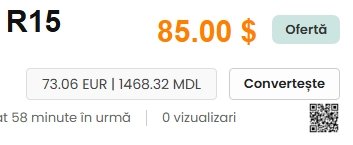
I've improved and updated the currency conversion plugin—there's now a Convert button, and the currency field only appears after clicking it. Friends, I think this is better than just having a currency field. And keep in mind that the plugin won't work for Russian users, as I've removed the display of their currency, the ruble.
 

Attachments

  • Снимок экрана_5-3-2026_151556_autopmr.jpeg
    Снимок экрана_5-3-2026_151556_autopmr.jpeg
    23.1 KB · Views: 0
  • multicurrency.zip
    4.2 KB · Views: 1

stoic

Member
XNullUser
Joined
Nov 22, 2025
Messages
43
Reaction score
21
Points
8
Location
Caribbean
NullCash
37
I like this improvement and modification.

I guess with more tweaks (if it's possible) the conversion button or text link could be fixed on the same line next to where "Add to Watchlist" & "Make Price Offer" might appear under the listing's price (if those plugins are installed) with the conversions appearing back next to the price like I saw in earlier modified versions.

That way the button/conversions don't partially cover other buttons (e.g Favorite Items if installed) nor the description title in desktop or mobile view.

I'm guessing too it won't be long for this plugin to get further modified with admin access to configure the text and background color of the convert button or give the choice for a text link or button.

Thank You.
 

aikis

Active member
Elite
XNullUser
Joined
Oct 9, 2021
Messages
160
Reaction score
162
Points
43
Website
autopmr.com
NullCash
176
I like this improvement and modification.

I guess with more tweaks (if it's possible) the conversion button or text link could be fixed on the same line next to where "Add to Watchlist" & "Make Price Offer" might appear under the listing's price (if those plugins are installed) with the conversions appearing back next to the price like I saw in earlier modified versions.

That way the button/conversions don't partially cover other buttons (e.g Favorite Items if installed) nor the description title in desktop or mobile view.

I'm guessing too it won't be long for this plugin to get further modified with admin access to configure the text and background color of the convert button or give the choice for a text link or button.

Thank You.
The button layout varies across themes. I'll try to modify it. I'm not ready to comment on the admin panel. I made one for myself for the Delta theme and I'm happy with the look. Everything needs to make sense, and I don't see the point in changing the color scheme or the admin panel, but if I have time, I'll tinker with it. Also, I just noticed one bug: the header in the index file contains a wrong link, even though I got the old (non-functional) plugin from the official developers. The bug can be fixed by deleting the link.
 
Top