
PrestaShop's standard structure only includes "Sale" or "New" labels. Based on this need, I developed a fully manageable and free module compatible with PrestaShop 1.7+ and PHP 7.4.
In this article, I'm sharing the Product Labels module I developed.
Module Highlights
This module I developed works like a fully-fledged campaign management tool, going beyond simply adding images:
Unlimited Tag Creation: You're not limited to a single tag. You can create as many different campaign tags as you want.
Smart Stacking: You can select the top left, top right, bottom left, or bottom right corners. If you add multiple tags to the same corner, they won't overlap; they will automatically be stacked one below the other.
Category Tree Selection: You determine which categories the tag will appear in by selecting from PrestaShop's category tree, not by typing IDs individually.
Show on All Products Option: If you don't want to bother selecting categories, you can apply the tag to all products on your site with a single click.
Custom Image or Icon Support: You can either enter a link to your own PNG/SVG image or use an icon code from the Google Material Icons library (e.g., local_shipping).
Live Preview: You see the result instantly while adjusting color, size, and text settings in the admin panel. Theme Compatibility: Using the displayProductListReviews and displayProductPriceBlock hooks, it works seamlessly with almost all themes.
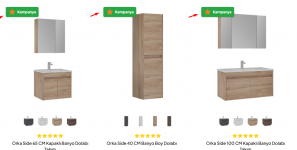
In this article, I'm sharing the Product Labels module I developed.
Module Highlights
This module I developed works like a fully-fledged campaign management tool, going beyond simply adding images:
Unlimited Tag Creation: You're not limited to a single tag. You can create as many different campaign tags as you want.
Smart Stacking: You can select the top left, top right, bottom left, or bottom right corners. If you add multiple tags to the same corner, they won't overlap; they will automatically be stacked one below the other.
Category Tree Selection: You determine which categories the tag will appear in by selecting from PrestaShop's category tree, not by typing IDs individually.
Show on All Products Option: If you don't want to bother selecting categories, you can apply the tag to all products on your site with a single click.
Custom Image or Icon Support: You can either enter a link to your own PNG/SVG image or use an icon code from the Google Material Icons library (e.g., local_shipping).
Live Preview: You see the result instantly while adjusting color, size, and text settings in the admin panel. Theme Compatibility: Using the displayProductListReviews and displayProductPriceBlock hooks, it works seamlessly with almost all themes.

